


MinistryGrid is LifeWay's online training platform for churches. It is built around a library of more than 3,500 training videos and 800 courses that leaders and volunteers watch on demand, and it costs $597 per year for an entire church.
This review covers what MinistryGrid does well, where it falls short, and how much it costs. It also looks at the best alternative for churches that want to build and run their own training instead of assigning videos from a fixed library.
What Is MinistryGrid?
MinistryGrid is a subscription training platform from LifeWay Christian Resources. Churches use it to assign ready-made video training on ministry topics, discipleship, and volunteer roles, and to track who has completed it.
The core of the product is its content library: hundreds of courses recorded by established Christian leaders. A church can hand a new volunteer or leader a curated path without producing the material themselves.
You can see the current plans on the official MinistryGrid site.
MinistryGrid Features
- Video library: over 3,500 training videos and 800 courses on ministry, discipleship, and volunteer roles.
- Custom content: upload your own videos and documents alongside the LifeWay library.
- Training paths: assign curated sequences to individuals, teams, or the whole church.
- Progress tracking: see who has started and completed assigned training.
- Unlimited users: one church subscription covers your entire congregation, with no per-seat fees.
- Anytime access: leaders and volunteers train on any device, on their own schedule.
MinistryGrid Pricing
MinistryGrid keeps pricing simple: $597 per year for an unlimited church subscription, billed annually or monthly. New annual subscribers get a 30-day money-back guarantee.
There are no per-user fees, so the cost is the same whether you train ten volunteers or a thousand. Access to the full library and the ability to assign it both require a paid subscription.
| Plan | Price | Users | Includes |
|---|---|---|---|
| MinistryGrid Unlimited | $597 / year | Unlimited | Full video library, custom content, training paths, completion tracking |
MinistryGrid Pros and Cons
What MinistryGrid does well:
- A large, ready-made library of trusted Christian training content.
- Flat, unlimited-user pricing that is predictable for a whole church.
- No content production required to get started.
- Simple assignment and completion tracking for volunteers and leaders.
Where it falls short:
- It is built around watching a video library, not building your own structured courses.
- Community, discussion, and live-session features for cohort-style learning are limited.
- Certificates and graded assessments are minimal compared with a full learning platform.
- The content carries LifeWay's editorial voice, which may not match every tradition or program.
Who MinistryGrid Is Best For
Churches researching MinistryGrid usually fall into one of two camps, and the right choice depends on which one you are in.
If you want to assign a ready-made library, MinistryGrid is a strong fit. Your main need is to hand volunteers and new leaders quality training on ministry basics without producing it yourself, and the library does exactly that. For many churches, that is all they need.
If you want to build and run your own programs, it is a weaker fit. A ministry school, structured discipleship, or a leadership track with live sessions, community, and certificates is not what a library-and-assign model is designed for. Those churches are better served by a full learning platform.
Put simply, MinistryGrid serves the broad group of churches that want to consume ready content. The narrower group that wants to build its own courses, and issue its own certificates, needs a platform. Our guide to effective church leadership training covers what those programs involve.
| If your church wants to... | Better fit |
|---|---|
| Assign ready-made ministry videos to volunteers | MinistryGrid |
| Build its own ministry school, courses, and certificates | A learning platform (see below) |
What to Look for in a Church Training Platform
Before choosing between MinistryGrid and an alternative, it helps to know what separates a content library from a full training platform. A few criteria matter most for churches:
- Build vs assign: can you create your own courses, or only assign a fixed library?
- Live and cohort learning: can you run scheduled classes and small groups, not just on-demand videos?
- Community: is there space for discussion and accountability between sessions?
- Certificates: can you recognize completed leadership and ministry training?
- Branding: does the experience carry your church's identity, or the vendor's?
- Pricing: is it predictable, and is there nonprofit pricing for churches?
MinistryGrid is built mainly for the first need on that list: assigning a ready-made library. The platform below is built for the rest.
The Best MinistryGrid Alternative: Teachfloor
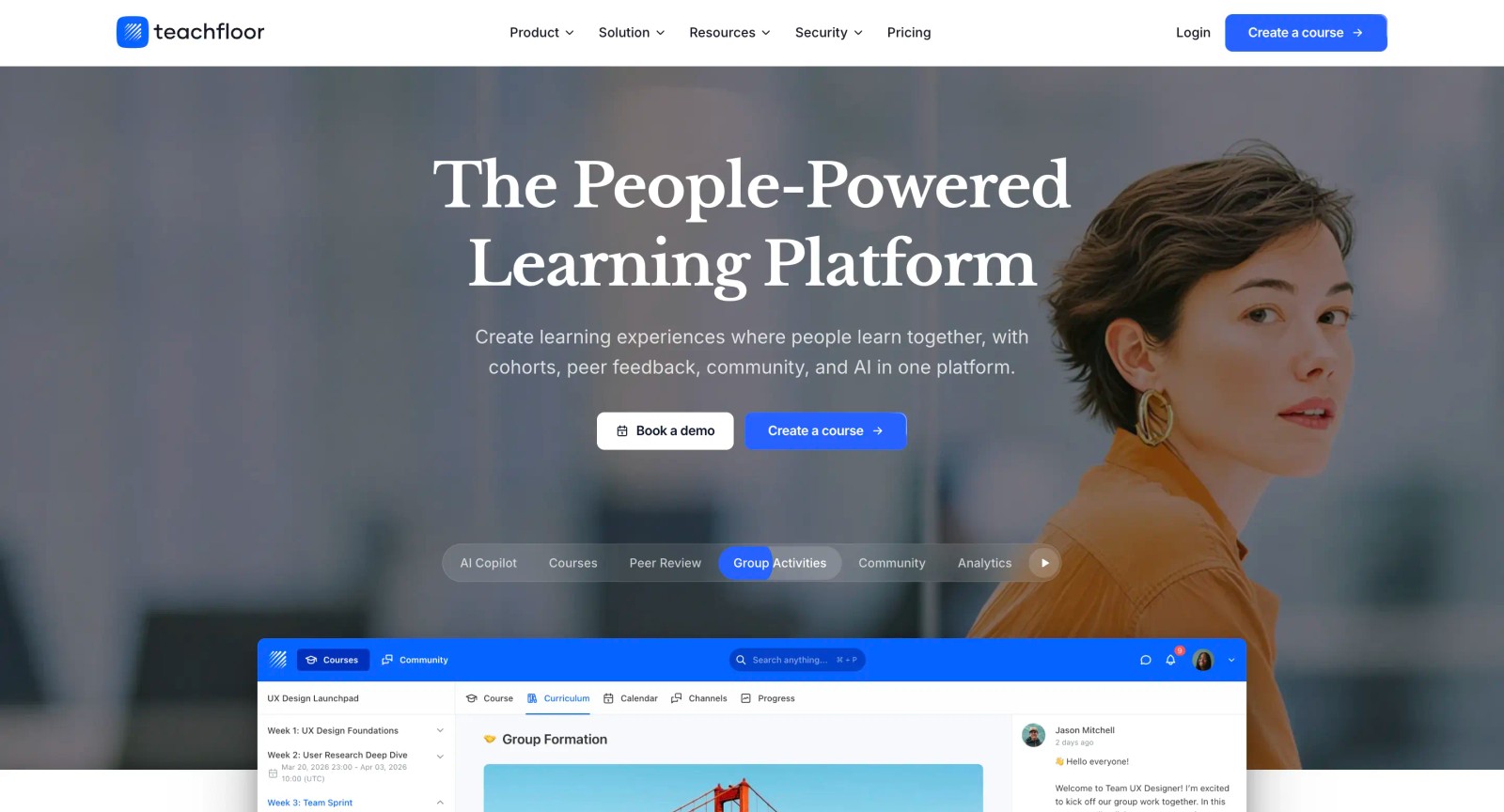
Teachfloor is a learning platform churches use to build and run their own training, discipleship, and ministry-school programs in one place.
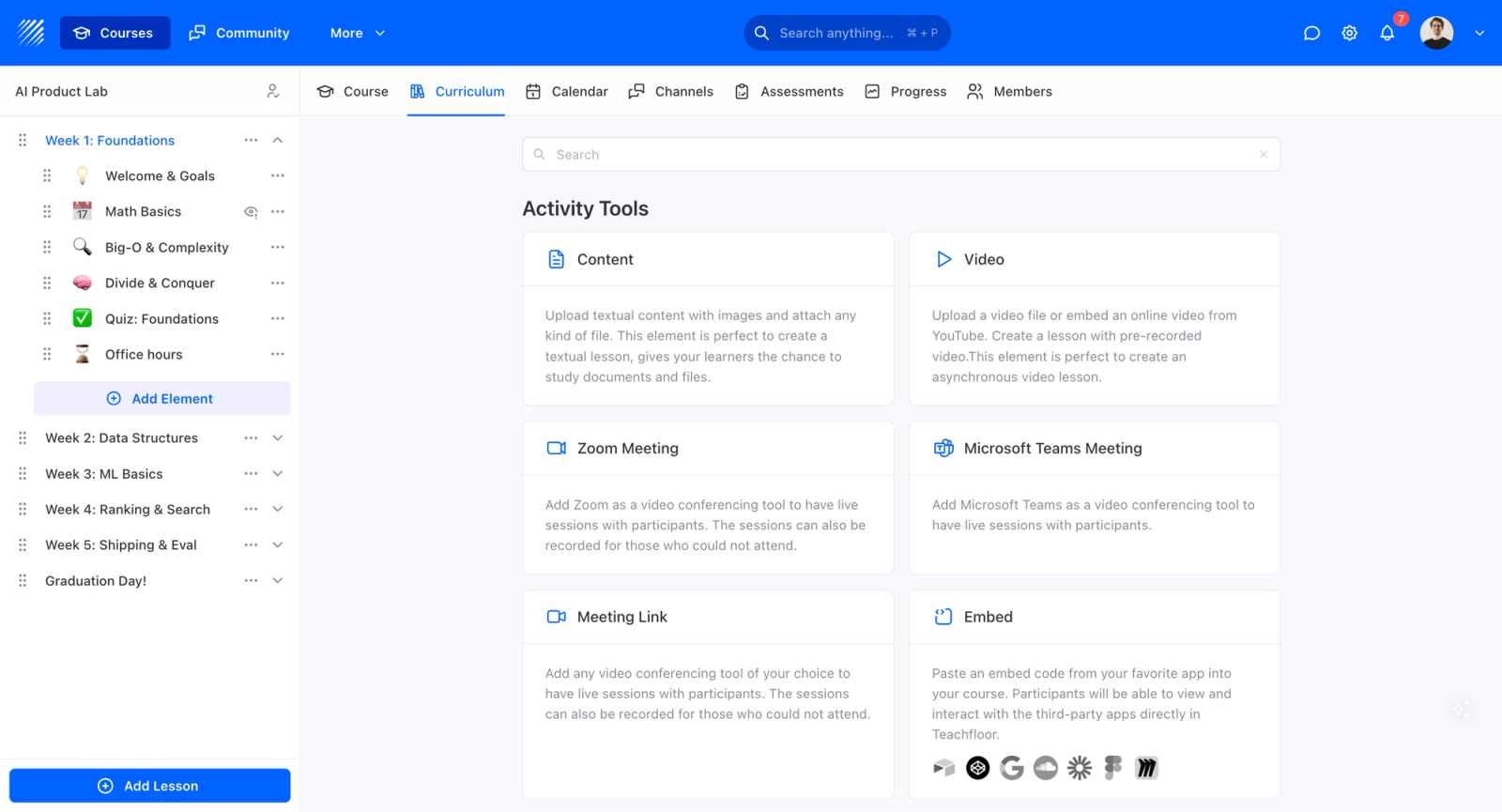
Instead of assigning videos from a fixed library, you create your own courses by combining video lessons, readings, live sessions, quizzes, and community. You then deliver them self-paced or as live cohorts, under your own branding.
The core difference is ownership of the program. Where MinistryGrid gives you content to assign, Teachfloor gives you a course builder to design discipleship pathways, membership classes, and leadership tracks exactly as your church teaches them.
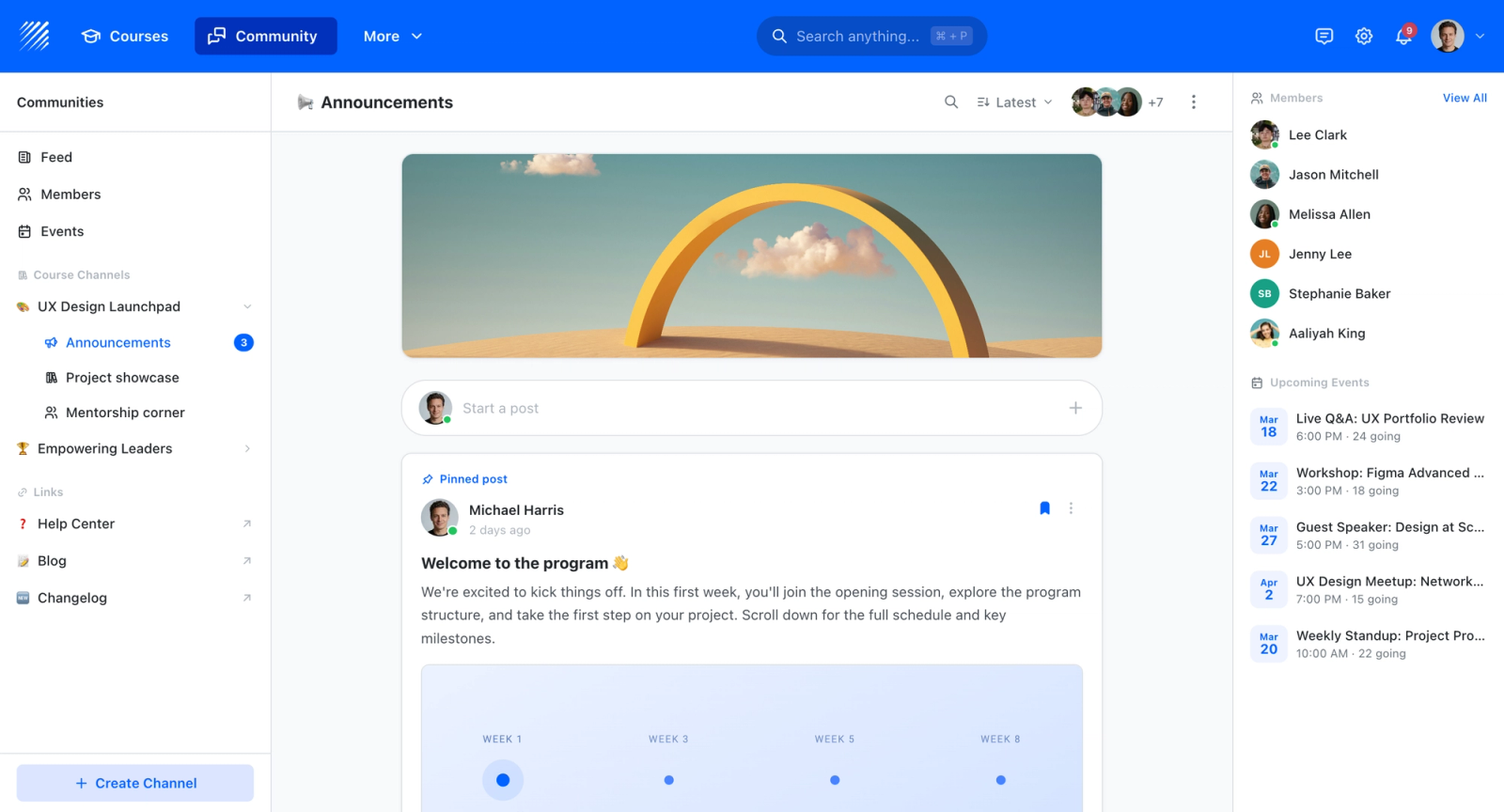
Every program includes community and small-group discussion, so training becomes a shared experience rather than isolated videos. Members stay engaged between sessions.
Churches can run live classes and cohorts with Zoom, Teams, or Google Meet built in, with recordings fetched automatically.
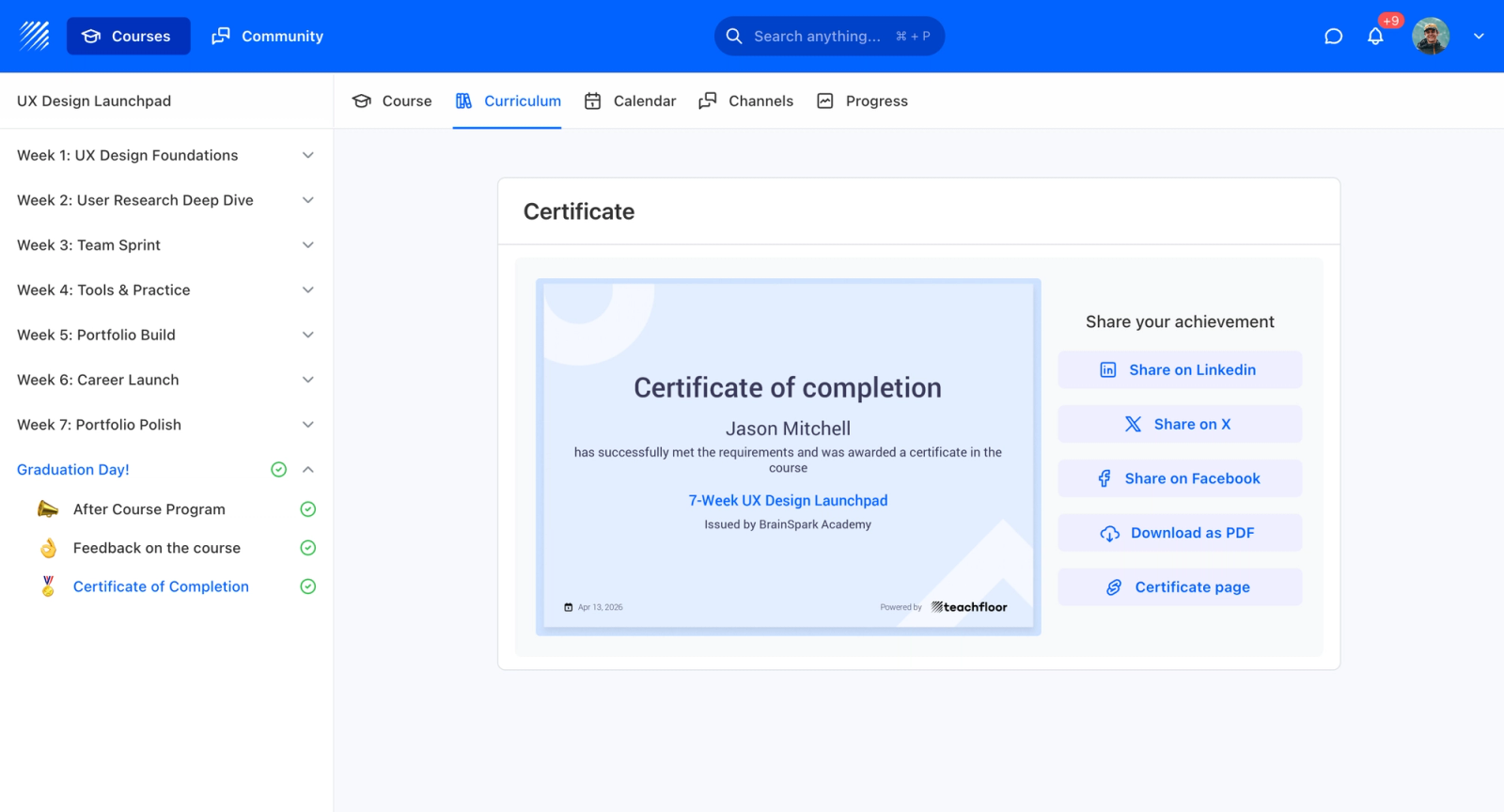
Completed leadership and ministry training is recognized with verifiable certificates and assessments, and the whole experience carries your church's identity through white-label branding: your own domain, logo, colors, and emails.
Because churches qualify as 501(c)(3) organizations, Teachfloor applies its nonprofit pricing.
This is not theoretical for large churches. Prestonwood Ministry School, part of one of the largest churches in the United States, runs its biblical training on Teachfloor to reach members and students well beyond its campus.
Teachfloor is not the right tool for every church, and it is not trying to be a content library. It tends to be the better fit when a church wants to:
- Run a real program: a ministry school, Bible school, or leadership institute, not just a set of assigned videos.
- Teach in structure: deliver discipleship as courses with a clear path, assignments, and progress.
- Meet live: combine self-paced lessons with live cohorts and small-group community.
- Recognize completion: issue verifiable certificates for finished leadership and ministry training.
- Scale across a network: train multiple campuses or affiliated ministries under one brand.
For those goals, the difference is not cosmetic. A library lets you assign what already exists; a platform lets you create what is yours. That is the line between the two products, and it is why churches building their own programs tend to outgrow a content library.
| MinistryGrid | Teachfloor | |
|---|---|---|
| Core model | Ready-made video library | Build your own courses |
| Custom courses | Upload content only | Full course builder |
| Live sessions & cohorts | No | Yes (Zoom, Teams, Meet) |
| Community & small groups | Limited | Built in |
| Certificates & assessments | Minimal | Custom, verifiable |
| White-label branding | Limited | Full (domain, logo, emails) |
| Pricing | $597 / year unlimited | Nonprofit pricing for churches |
| Best for | Assigning existing training | Running your own programs |
See how churches set this up in our guide to the best LMS for churches.
MinistryGrid vs Teachfloor: How to Choose
The decision comes down to one question: do you want to assign training or build it?
If your church mainly needs a library of ready-made ministry videos to hand to volunteers, MinistryGrid is a practical, affordable choice. If you want to run your own discipleship pathways, ministry school, or leadership program as structured courses with live sessions, community, and certificates, a full platform like Teachfloor fits better.
Some churches pair the two, using a content library for off-the-shelf topics and their own platform for the programs that define their ministry. If church management, giving, or events are also on your list, those are separate tools: our roundups of church management software and ChurchSuite alternatives cover them.
Frequently Asked Questions
What is MinistryGrid?
MinistryGrid is LifeWay's online training platform for churches. It provides a library of more than 3,500 videos and 800 courses on ministry, discipleship, and volunteer topics that churches assign to leaders and volunteers, track for completion, and supplement with their own content.
How much does MinistryGrid cost?
MinistryGrid costs $597 per year for an unlimited church subscription, billed annually or monthly, with a 30-day money-back guarantee for new annual subscribers. There are no per-user fees.
Is there a free MinistryGrid alternative?
Free and open-source learning tools like Moodle exist, but they need technical setup, hosting, and maintenance that most church teams do not have time for. Teachfloor is not free, but its nonprofit pricing for churches often makes the total cost lower once hosting and volunteer time are accounted for, while letting you build your own courses rather than only assign a library.
Can you build your own courses in MinistryGrid?
You can upload your own videos and documents into MinistryGrid alongside the LifeWay library, but the product is library-first. To build structured courses with live sessions, community, and certificates, a dedicated learning platform such as Teachfloor is a better fit.
What is the best alternative to MinistryGrid?
For churches that want to build and run their own discipleship, ministry-school, and leadership training rather than assign a fixed video library, Teachfloor is the strongest alternative. It combines a course builder, live sessions, community, and certificates in one branded platform, with nonprofit pricing for churches.
Whether you assign a library or build your own programs, the right platform depends on how your church actually trains. To run discipleship, leadership, and ministry-school training as your own courses, see how churches use Teachfloor as their LMS for churches, or book a demo.


