
Automate repetitive tasks across your programs.
Build visual workflows that handle onboarding, reminders, follow-ups, and access management at any scale.
Used by hundreds of teams shaping how the world learns













What automations handle for you.
Enrollment, reminders, follow-ups, and access rules run on their own.
Set up once, runs every time
Build a workflow once and it executes automatically on every new enrollment, completion, or schedule.
Reach specific learners automatically
Use filters to target by role, activity, or course. Only the right people get the right action.
See what ran, what failed, and why
Every execution is logged with status, timestamps, and error details. Retry or fix issues in one click.
Build workflows that run your program.
Triggers, filters, logic, and actions, connected visually and executed automatically.
Design automations visually, step by step.
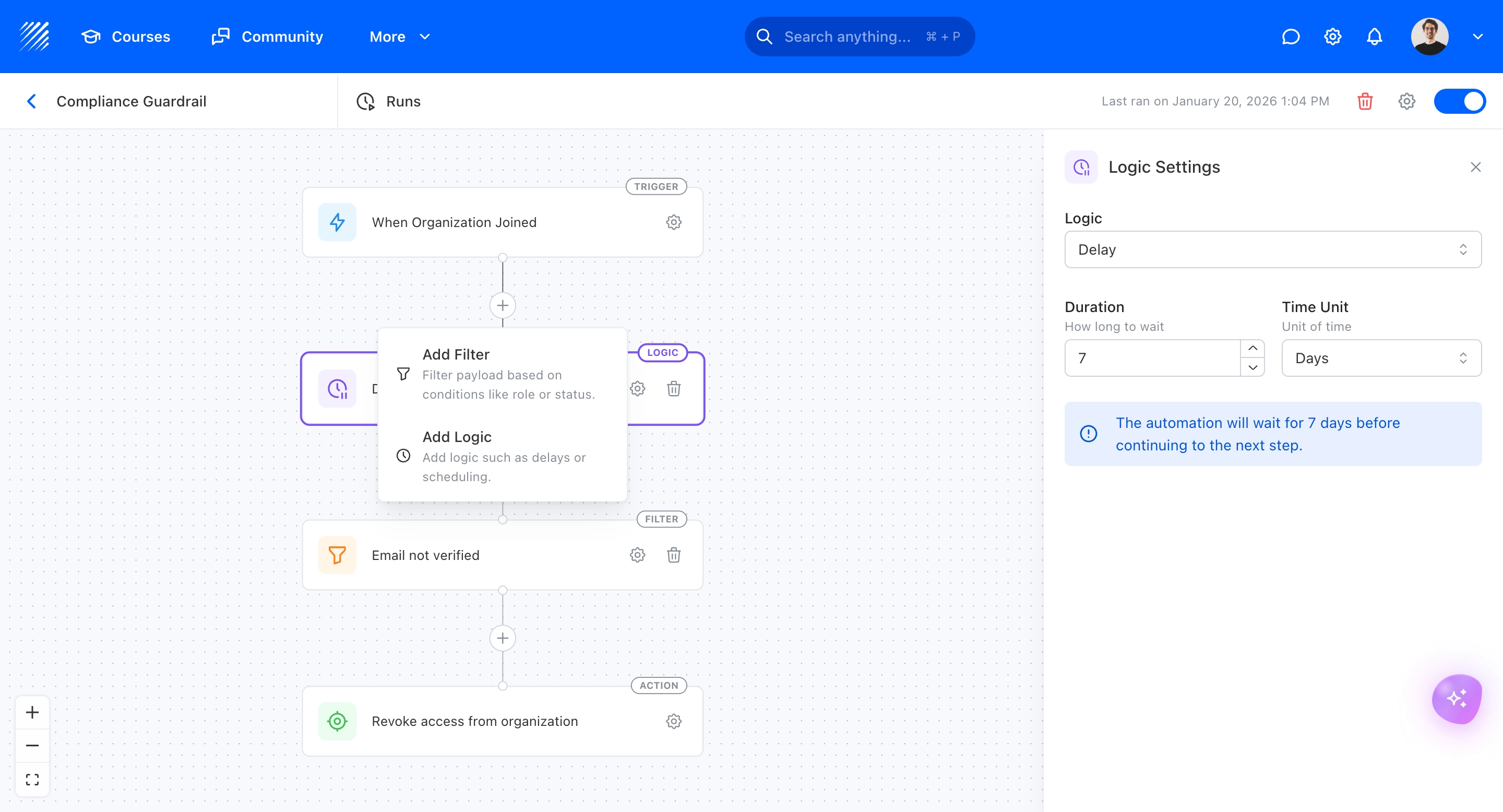
A drag-and-drop flow editor where you connect triggers, filters, and actions. Each block is a clear step, so you can see the entire logic at a glance without writing code.
Trigger any workflow. Narrow the audience with filters.
Choose what starts the workflow, like a course completion, a schedule, or an org event. Then narrow down with filters such as roles, activity, courses, or custom conditions.
Automate emails, enrollments, and access.
Define what happens when conditions are met. Send personalized emails, enroll learners in courses, or revoke access, all triggered automatically.
See every execution. Catch every failure.
A full log of every automation run with status, timestamps, and step-by-step details. Know exactly what happened and what went wrong.
Fits into your stack.
Live delivery, embedded tools, and enterprise identity, connected where it matters.


























“A modern learning platform that finally feels human”
“Not just an LMS, but a real learning community”
“Amazing support and true partnership”
“Finally a platform that our students actually enjoy using”
“The platform that helped us scale across 4 departments”
“Simple, modern, and very effective”
“Very easy to create and manage courses.”
All reviews are collected and hosted on G2.com.
Frequently asked questions
Automate the busywork.
Integration patterns, workflow examples, and email sequences that run learning programs on autopilot.
Custom Workflows on Teachfloor
No-code workflow builder: triggers, conditions, and actions across your programs.
New Zapier Triggers & Actions
Connect Teachfloor to 5,000+ tools via expanded Zapier triggers and actions.
10 Smart Teachfloor Automations
Real automation recipes from learning organizations: what they automate and why.
Essential Email Sequences for Course Creators
The exact email sequences that course creators use to drive enrollment and completion.
What is Training Needs Analysis?
The framework that decides what should be automated vs. designed by humans.
26 Best LMS Integrations
The integrations that automate your learning business, from CRM to analytics.
Custom Workflows on Teachfloor
No-code workflow builder: triggers, conditions, and actions across your programs.
New Zapier Triggers & Actions
Connect Teachfloor to 5,000+ tools via expanded Zapier triggers and actions.
10 Smart Teachfloor Automations
Real automation recipes from learning organizations: what they automate and why.
Essential Email Sequences for Course Creators
The exact email sequences that course creators use to drive enrollment and completion.
Explore more features.
Create engaging and interactive courses at scale.
Run cohorts, programs and academies, all in one platform. Start today.