Everything searchable. Everything reusable.
Store training assets in one shared library, reuse them across programs, and find anything instantly with Universal Search.
Used by hundreds of teams shaping how the world learns








What the resource library gives your team.
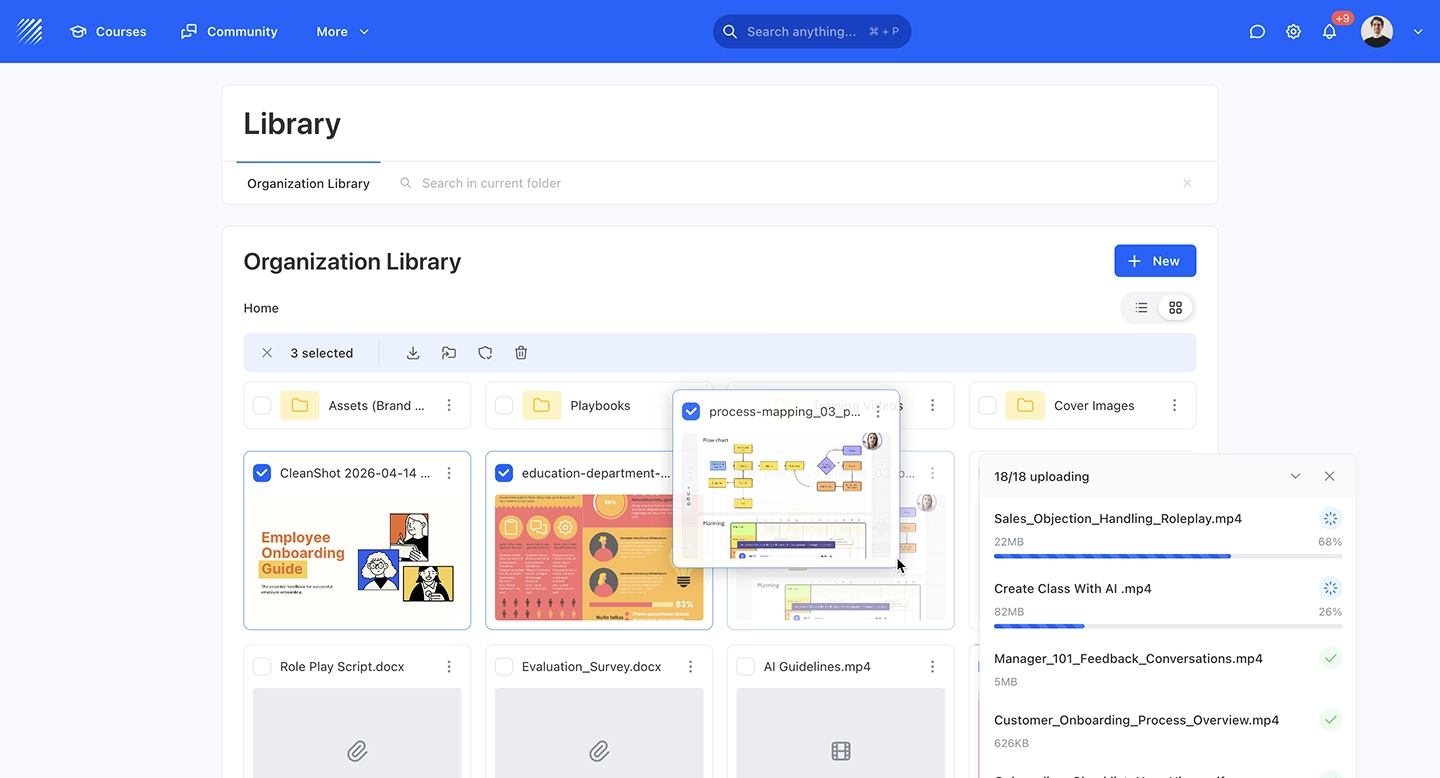
One place for all training assets, organized, searchable, and reusable across programs.
Store everything in one library
PDFs, videos, SCORM packages, documents, and links, all in a central repository accessible to instructors and admins.
Find content instantly
Universal search across all resources with filters by type, tag, and course. No more digging through folders or shared drives.
Reuse assets across courses
Attach any resource to multiple courses without duplicating files. Update once, changes reflect everywhere it's used.
Store, reuse, and find anything instantly.
A shared library and universal search — built into your learning platform.
A shared library for all your training assets.
Keep PDFs, slides, and templates in a central library. Reuse them across courses, control access, and find files fast with tags and search.
One file, many programs. Zero duplication.
Link a single resource to multiple courses without copying it. Update once, and every program using it stays current — no manual syncing required.
Find anything. Instantly.
One search bar to find courses, lessons, files, activities, and users. Type a keyword and get results across every content type on the platform — with type badges and direct links.
Control who sees and does what.
Define upload, manage, and view permissions by role. Admins get full control, instructors can contribute, and learners see only what they need — all configurable per resource.
Fits into your stack.
Live delivery, embedded tools, and enterprise identity, connected where it matters.















“A modern learning platform that finally feels human”
“Not just an LMS, but a real learning community”
“Amazing support and true partnership”
“Finally a platform that our students actually enjoy using”
“The platform that helped us scale across 4 departments”
“Simple, modern, and very effective”
“Very easy to create and manage courses.”
All reviews are collected and hosted on G2.com.
Frequently asked questions
Build a content library learners actually use.
Content management, asset organization, and authoring tools: frameworks for the LMS library you'll wish you had earlier.
Library: Organize and Share Materials
The official Library launch: a central place for every reusable course asset.
File Activity: PDF & CSV
Native PDF and CSV file viewer inside lessons, no downloads needed.
What is a Content Library?
The role of a content library in modern LMS: structure, search, and reusability.
27 Key eLearning Content Types
The content types every academy library needs, and how to organize them.
10 Best Online Teaching Tools
Tools to create the assets your library will hold, from video to interactive.
12 Best eLearning Authoring Tools
Authoring tools that integrate with your LMS library: features and pros & cons.
Convert MP4 Video to SCORM (Free Tools)
Step-by-step guide to wrapping MP4 videos into LMS-trackable SCORM packages, for a content library that tracks completion.
Library: Organize and Share Materials
The official Library launch: a central place for every reusable course asset.
File Activity: PDF & CSV
Native PDF and CSV file viewer inside lessons, no downloads needed.
What is a Content Library?
The role of a content library in modern LMS: structure, search, and reusability.
27 Key eLearning Content Types
The content types every academy library needs, and how to organize them.
Explore more features.
Create engaging and interactive courses at scale.
Run cohorts, programs and academies, all in one platform. Start today.