

What Is Edlink?
Edlink is an API middleware platform that connects EdTech applications to learning management systems (LMS) and student information systems (SIS). It provides a single, unified API that EdTech companies can integrate once to exchange data with dozens of school platforms, instead of building and maintaining separate integrations for each one.
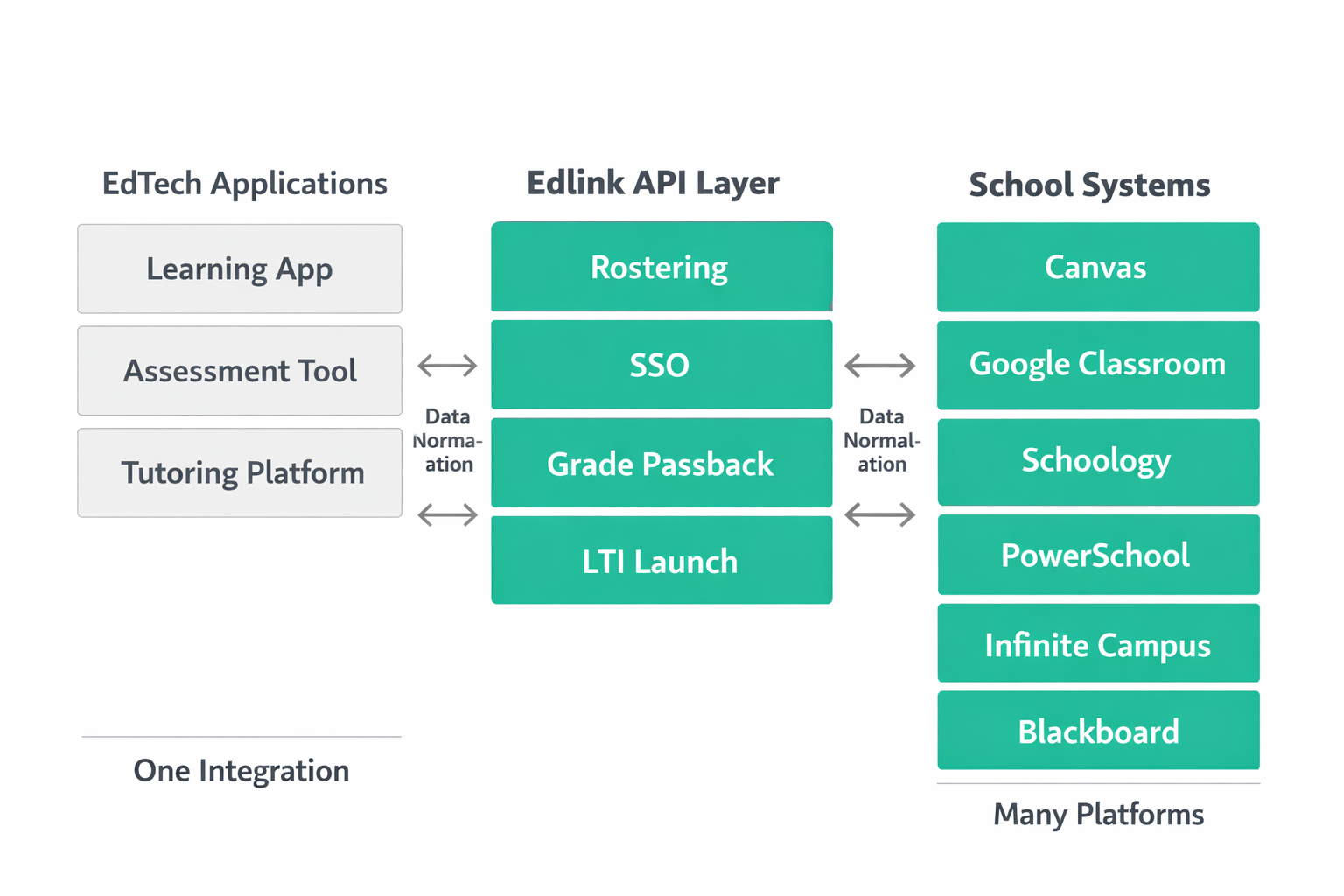
The core problem Edlink addresses is integration fragmentation. Schools use different combinations of LMS and SIS products. Canvas, Schoology, Google Classroom, PowerSchool, Infinite Campus, Blackbaud, and many others each have their own APIs, authentication protocols, and data formats. An EdTech company that wants to serve schools across districts must build integrations for every platform its customers use. Edlink sits between the EdTech application and these school systems, normalizing the data and handling the connection logic.
Edlink translates roster data, user authentication, class enrollments, assignments, and grades into a consistent format regardless of which LMS or SIS the school runs. For developers, this reduces implementation work to a single integration. For schools, connecting a new tool to an existing Edlink setup takes days rather than weeks.
How Edlink Works
Edlink operates as an abstraction layer between EdTech applications and institutional systems. The architecture follows a middleware pattern: the EdTech app communicates with the Edlink API, and Edlink communicates with the school's LMS or SIS on the app's behalf.
When a school district connects to an EdTech product through Edlink, an administrator authorizes the connection via Edlink's dashboard. This grants Edlink permission to access the district's roster data, course structures, and user records from the underlying LMS or SIS. Edlink then normalizes this data into its own standardized schema and makes it available to the EdTech application through REST API endpoints.
The data flow is bidirectional. Edlink can pull roster and enrollment data from the school system into the EdTech app, and it can push data like assignment submissions and grades back to the LMS. This grade passback capability is critical for maintaining a single gradebook experience for teachers, even when students complete work in a third-party tool.
Authentication follows a similar pattern. Instead of building separate single sign-on (SSO) flows for each LMS, EdTech apps delegate authentication to Edlink. When a user logs in through their school's LMS, Edlink handles the OAuth or LTI handshake and returns a standardized user identity to the application.
Edlink supports both real-time API calls and scheduled data syncs. Real-time calls are useful for authentication and grade passback. Scheduled syncs handle rostering, where bulk enrollment data updates nightly or at intervals the district configures. This hybrid approach balances data freshness with performance.
Key Features of Edlink
Unified Rostering API. Edlink ingests roster data from multiple LMS and SIS platforms and exposes it through a single API. This includes students, teachers, classes, schools, and district hierarchies. EdTech apps receive consistent data structures regardless of whether the source system is PowerSchool, Clever, Canvas, or any other supported platform. Roster data includes enrollments, class periods, grade levels, and demographic fields where available.
Single Sign-On. Edlink provides SSO across all connected platforms. Teachers and students authenticate through their existing school credentials. The application receives a verified user identity without needing to implement separate authentication flows for Google, Microsoft, ClassLink, Canvas, or Schoology, students use one set of credentials and the EdTech app handles no password management.
Grade Passback. When students complete assignments in a third-party EdTech tool, Edlink pushes grades back to the school's LMS gradebook. This means teachers do not need to manually transfer scores between systems. Grade passback supports both simple point values and more structured grading schemas, depending on the LMS capabilities.
LTI Support. Edlink supports LTI (Learning Tools Interoperability), the 1EdTech standard for connecting learning tools with LMS platforms. This includes LTI 1.1 and LTI 1.3 launches, allowing EdTech apps to be embedded directly within the LMS interface. Edlink can manage LTI key registration and launch validation, simplifying the implementation burden for developers.
API Unification Across Platforms. Edlink maintains connectors for Canvas, Schoology, Google Classroom, Brightspace, Blackboard, Moodle, PowerSchool, Infinite Campus, Skyward, and other systems. When a school switches from one LMS to another, the application's integration with Edlink does not change, the connector layer absorbs platform-specific differences, insulating developers from churn on the school side.
Data Sync and Webhooks. Beyond real-time API calls, Edlink offers webhook notifications for roster changes. When a student transfers schools, a teacher is reassigned, or a class roster updates, Edlink can notify the EdTech app automatically. This reduces reliance on polling and keeps data current without constant API requests.
Dashboard and Analytics. Edlink provides a management dashboard where both EdTech companies and district administrators can monitor integration health, view connected schools, troubleshoot sync issues, and manage permissions. This operational visibility helps identify data discrepancies before they affect end users.
Edlink Use Cases
EdTech Companies Building School Integrations. The primary audience for Edlink is EdTech companies that sell products to K-12 or higher education institutions. These companies face a recurring challenge: every new school district may use a different LMS or SIS, and each integration requires engineering time, testing, and ongoing maintenance. Edlink eliminates this per-platform engineering cost. A math practice app, an assessment tool, or a reading platform can integrate with Edlink once and immediately support schools running Canvas, Google Classroom, Schoology, or Moodle.
School Districts Onboarding New Tools. From the district side, Edlink simplifies the procurement and deployment of new EdTech tools. When a district selects a product that uses Edlink, the IT administrator connects the district's LMS or SIS to Edlink once. Subsequent tools that also use Edlink can be activated without additional infrastructure work. This reduces the onboarding timeline from weeks to days for each new tool.
LMS Vendors Extending Their stack. LMS providers can partner with Edlink to expand the range of third-party tools available to their customers without building individual integrations. This is particularly relevant for smaller or regional LMS platforms that lack the engineering resources to build and maintain a large app marketplace. Edlink acts as the integration backbone.
Higher Education Institutions. While Edlink's roots are in K-12, its support for platforms like Canvas, Blackboard, and Brightspace extends its relevance to higher education. Universities deploying supplementary learning tools can use Edlink to manage interoperability between their institutional LMS and third-party applications, maintaining consistent student identity and grade data across systems.
Curriculum Publishers and Content Providers. Publishers distributing digital curriculum to schools need their content accessible within the platforms teachers already use. Edlink enables content providers to deliver assignments, resources, and assessments directly within the LMS through LTI, with roster awareness and grade passback included. Learning platforms serving institutional clients benefit from the same pattern: clean roster data and SSO reduce onboarding friction for every school that already has Edlink deployed.
Limitations and Considerations
Dependent on Source System Quality. Edlink normalizes data format and structure, but it cannot correct errors in the underlying records. If a school's SIS contains outdated enrollments, duplicate student records, or incomplete class rosters, those problems appear in every connected application. Districts with poor data governance need to address data quality at the SIS level before expecting reliable output from any integration layer.
Coverage Gaps. While Edlink supports a broad set of LMS and SIS platforms, coverage is not universal. Smaller, regional, or proprietary systems may not have Edlink connectors. EdTech companies targeting specific markets should verify that their target districts use supported platforms before committing to Edlink as their sole integration strategy.
Cost Structure. Edlink charges EdTech companies based on connected institutions or API usage. For early-stage companies with limited budgets, this adds a recurring cost to their infrastructure. The trade-off between building integrations in-house and paying for middleware depends on the number of platforms a company needs to support and the engineering resources available.
Limited Customization of Data Models. Edlink's unified schema is designed for broad compatibility, which means it may not capture every custom field or data attribute that a specific LMS or SIS exposes. EdTech apps with highly specialized data requirements may find that Edlink's normalized output omits fields they need, requiring supplementary direct integrations for specific platforms.
Latency in Bulk Syncs. Scheduled roster syncs introduce latency. A student added to a class in the SIS may not appear in the EdTech app until the next sync cycle. For applications where real-time enrollment awareness is critical, this delay can create user experience gaps. Webhook support mitigates this, but not all source systems support the event-driven updates that webhooks require.
Vendor Dependency. Relying on Edlink as the sole integration layer creates a dependency. If Edlink experiences downtime, changes its pricing, deprecates a connector, or alters its API, every EdTech app using it is affected. Companies should assess this risk alongside the engineering savings.
How Edlink Compares to Alternatives
Edlink is not the only solution for EdTech integration. Several alternatives address similar challenges, each with different approaches and trade-offs.
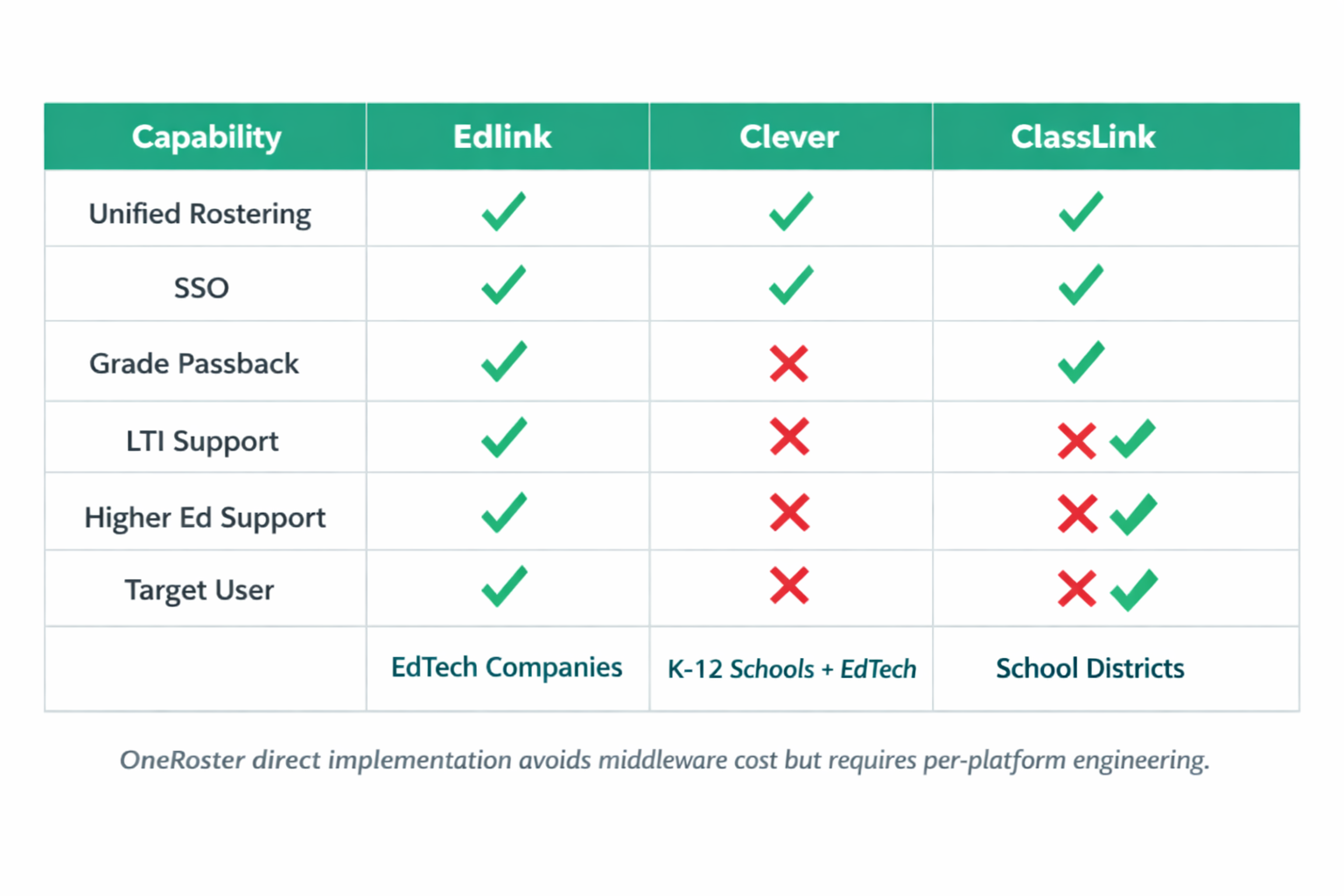
Edlink vs. Clever. Clever is the most widely adopted rostering and SSO platform in U.S. K-12 education. It provides a free integration portal for schools and charges EdTech companies for data access. Its strength is installed base: a significant portion of U.S. school districts already have it configured. The key difference is scope. Clever focuses primarily on rostering and SSO, while Edlink offers deeper LMS integration including grade passback and LTI management. Clever also does not cover higher education platforms. Many EdTech companies integrate with both: Clever for district reach and Edlink for LMS-level functionality.
Edlink vs. ClassLink. ClassLink provides SSO, rostering, and analytics to school districts. It operates as a district-facing platform rather than an EdTech-facing middleware. ClassLink's LaunchPad SSO is deployed in thousands of districts, offering students a single portal for all their digital tools. The difference is perspective. ClassLink is a product schools buy to manage their stack. Edlink is a service EdTech companies use to connect to schools. They are complementary rather than directly competitive in most scenarios. An EdTech app using Edlink can still work with districts that use ClassLink for SSO.
Edlink vs. OneRoster Direct Implementation. OneRoster is a 1EdTech standard for exchanging roster data between systems. Some EdTech companies implement OneRoster directly rather than using middleware. The advantage is no middleware dependency or cost. The disadvantage is that OneRoster implementation quality varies across SIS and LMS platforms. Each vendor's OneRoster API has quirks, inconsistencies, and version differences. Edlink handles these inconsistencies behind its unified API, saving engineering time at the cost of adding a dependency.
Edlink vs. Custom Integrations. The alternative to any middleware is building direct integrations. This gives full control over data handling, timing, and error management. For companies that only serve one or two LMS platforms, direct integration may be more cost-effective than middleware. The calculus shifts as the number of required integrations grows. Beyond three or four platforms, the maintenance burden of custom integrations typically exceeds the cost of middleware.
The right choice depends on three factors: how many distinct LMS and SIS platforms a company's customers actually use, whether deep LMS features like grade passback are required or basic rostering suffices, and the engineering capacity available to build and maintain direct integrations as an alternative.
Frequently Asked Questions
What platforms does Edlink integrate with?
Edlink supports integrations with major LMS platforms including Canvas, Schoology, Google Classroom, Brightspace (D2L), Blackboard, and Moodle. On the SIS side, it connects with PowerSchool, Infinite Campus, Skyward, and others. The platform regularly adds new connectors. EdTech companies should check Edlink's documentation for the current list of supported systems, as coverage expands over time.
Is Edlink only for K-12 education?
No. While Edlink was originally built to address K-12 integration challenges, it supports higher education platforms like Canvas, Blackboard, and Brightspace. Universities and colleges deploying third-party learning tools can use Edlink for roster syncing, SSO, and grade passback. The data models accommodate both K-12 structures (districts, schools, grade levels) and higher education structures (institutions, departments, course sections).
How does Edlink handle student data privacy?
Edlink acts as a data processor, not a data controller. It transmits data between systems that already have authorization to hold student records. Edlink maintains compliance with FERPA and signs Student Data Privacy Agreements with districts. Data is encrypted in transit and at rest. The platform does not sell or repurpose student data. EdTech companies using Edlink remain responsible for their own data privacy practices within their applications.
What is the difference between Edlink and SCORM?
SCORM is a content packaging standard that defines how learning content is structured and launched within an LMS. Edlink is an integration middleware that handles data exchange between applications and school systems. SCORM governs how a course module behaves inside an LMS. Edlink governs how an external application connects to an LMS for roster data, authentication, and grades. They solve different problems and are not substitutes for each other.
Does Edlink replace the need for LTI?
Edlink does not replace LTI. It supports and simplifies LTI implementation. LTI is the standard protocol for launching learning tools from within an LMS. Edlink manages LTI key configuration, launch validation, and the associated data exchange. EdTech companies using Edlink still use LTI as the underlying launch mechanism, but Edlink handles the complexity of supporting multiple LTI versions and platform-specific behaviors.


