
Two-Factor Authentication
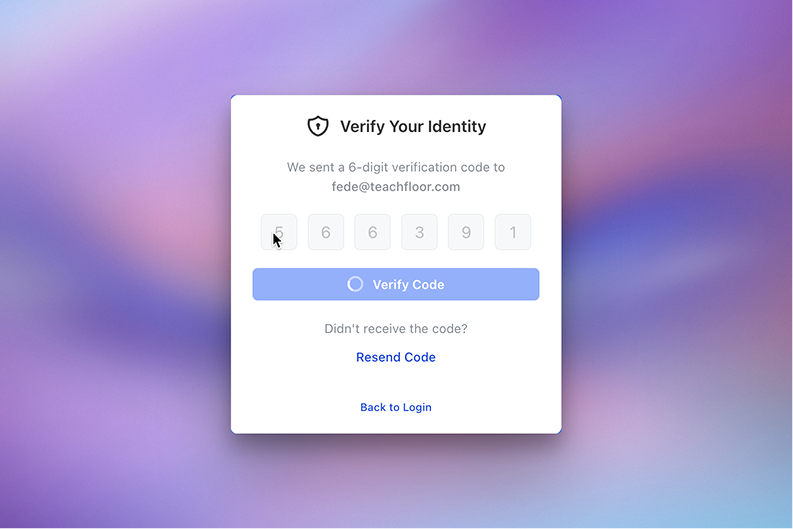
We’re introducing Two-Factor Authentication (2FA) for password-based logins, giving organizations an additional layer of protection for user accounts inside Teachfloor.
With this new option, users are required to verify their identity with a one-time code sent via email after entering their password.
This helps prevent unauthorized access and strengthens overall platform security.
How It Works
When Two-Factor Authentication is enabled:
- Users log in with their email and password as usual
- A 6-digit verification code is sent to their email
- Users must enter the code to complete the login process
Access is granted only after successful verification.
Easy to Enable at Organization Level
Admins can activate this feature directly from:
Settings → General → Security
Once enabled, all users logging in with a password will be required to complete the verification step.
This ensures consistent security across the entire organization without additional setup.
Built for Security Without Complexity
The verification flow is designed to be simple and fast:
- No external apps required
- No complex setup for users
- Clear and guided login experience
Users can also request a new code if needed, ensuring smooth access without friction.
Why It Matters
As organizations scale, protecting user accounts becomes increasingly important.
Two-Factor Authentication helps you:
- Reduce the risk of unauthorized access
- Protect sensitive course and learner data
- Enforce stronger security standards across your organization
It’s a simple but critical upgrade for teams managing learners, instructors, and internal staff.
Available Now
Two-Factor Authentication is now available in Teachfloor and can be enabled from your organization settings.


