
AI Orchestrator: Run Teachfloor with Natural Language
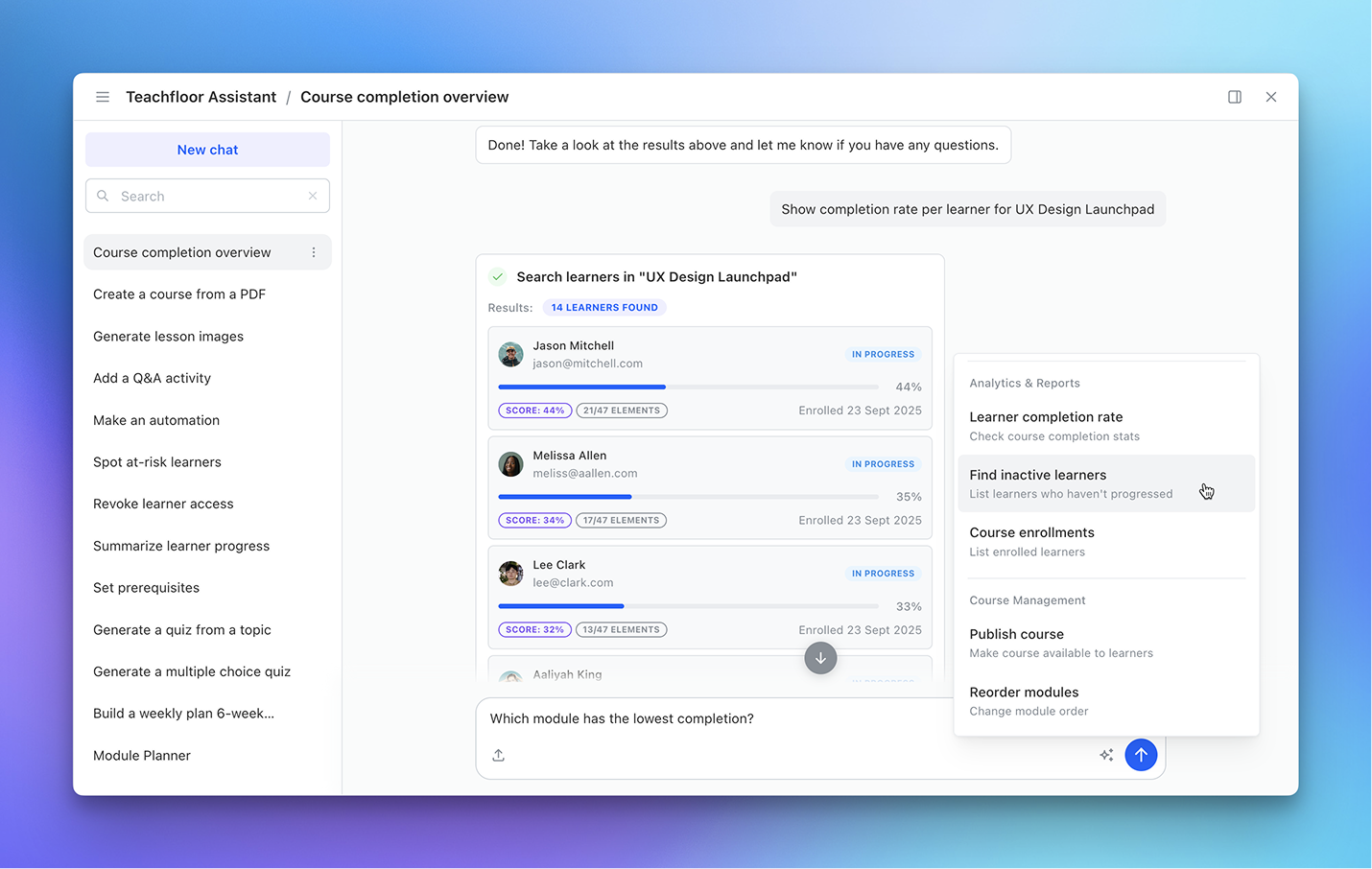
We’re introducing AI Orchestrator, a new core capability that allows admins and instructors to operate Teachfloor using natural language.
Instead of navigating menus, clicking through settings, or manually configuring workflows, you can now execute actions, generate content, and analyze data directly from a single AI interface.
AI Orchestrator turns Teachfloor into an operational layer you can control simply by writing what you want to achieve.
A Single Interface to Do Everything
AI Orchestrator acts as a unified control layer across your entire organization.
From one chat interface, you can:
- create courses, modules, and lesson elements
- generate quizzes, forms, and content
- configure automations and workflows
- retrieve learner data and completion insights
- search across courses, users, and resources
- manage enrollments and course structure
Instead of switching between multiple sections of the platform, everything is now accessible through one conversational interface.
From Action to Execution in Seconds
You can describe what you need in plain language and let the system handle execution.
For example:
- “Create a 6-week course on Product Management with weekly modules”
- “Show learners with less than 40% completion”
- “Generate a quiz for this lesson”
- “Send a reminder to inactive learners”
AI Orchestrator translates intent into actions instantly, removing operational friction.
Built for Creation, Management, and Analysis
This is not just a content generator or assistant. AI Orchestrator is designed to cover the full lifecycle of learning operations:
- Create → courses, modules, activities, and assets
- Manage → structure, enrollments, and automations
- Analyze → learner progress, engagement, and completion data
It connects directly with Teachfloor’s core systems, allowing real execution — not just suggestions.
Designed for Scale
As programs grow, complexity increases: more courses, more learners, more data.
AI Orchestrator helps you:
- reduce time spent on manual setup
- eliminate repetitive platform navigation
- act on data faster
- manage large-scale programs with less operational overhead
It’s especially powerful for organizations running multiple cohorts, large academies, or enterprise training programs.
Why It Matters
Teachfloor has always been designed around structured, interactive learning.
AI Orchestrator adds a new layer on top: execution at speed.
Instead of learning how to use the platform, you can now tell the platform what to do.
This fundamentally changes how teams build, manage, and scale learning programs.
Available Now
AI Orchestrator is now available inside Teachfloor.
Start using it to create, manage, and analyze your learning operations — faster than ever.


