

Teachfloor is a platform that makes every learning group effective for entrepreneurs, executives, and experts who support each other on their entrepreneurial journey.
As the famous quote goes, "Great responsibility comes with great opportunity."
Entrepreneurs face multiple challenges and obstacles in building their empires. To succeed, they need accountability groups outside of their business to ask for advice, feedback, and support. Having a trusted group that has their back when they are lost navigating their entrepreneurial journey could bring massive growth to their personal and professional success.
Stephen Covey, who wrote one of the most successful self-help books of all time, The 7 Habits of Highly Effective People, pointed out that interdependence is the highest form of effectiveness at work and at home. When synergy is created, it brings real growth to groups such as masterminds.
This guide covers how to run a mastermind group and find the right people to join it. The topics ahead:
- The definition of a Mastermind and its origin
- Advantages of running or joining a Mastermind Group
- 10 steps to start your own Mastermind Group (with examples)
- Additional questions you might ask yourself
We also have a little gift at the end of this guide. So, please keep reading and learning until the very end.
What is a Mastermind?
The term 'Mastermind' was coined by Napoleon Hill in his book Think & Grow Rich. Hill discovered that forming partnerships and learning groups to exchange ideas and give feedback was one of the keys to success for the most influential businessmen in the 19th century.
Thought leaders, businessmen, and industry experts of our era have adapted this term to create learning groups of highly accountable and growth-driven executives and entrepreneurs. In short, it still works. But with a different approach.
A **mastermind group is a close-knit group of entrepreneurs or experts who meet regularly to support each other's growth and success.** This group creates a space for mutual learning and development through collaboration, brainstorming, and feedback. Members tend to share a similar level of competence, yet they bring diverse skills and backgrounds that enrich discussions with different perspectives. To go deeper on the model behind it, see our guide on community-based learning.
In some cases, this group is also called an advisory board or personal board of directors. A mastermind lives on three things: accountability, peer learning, and regular live sessions. That combination is exactly what Teachfloor is built for, which is why it works well as the platform to run one. Its flexibility lets you bundle a built-in community, threaded discussion, scheduled live sessions, member screening and onboarding, and payments into a single cohort space, instead of stitching together a video tool, a chat app, and a payment processor. The rest of this guide shows how the pieces fit together.
Advantages of a Mastermind Group
Discover why highly successful businessmen are getting addicted to forming their trustworthy groups and how they are benefiting from them.
Opportunities for growth
Imagine yourself as an entrepreneur surrounded by highly competent, reliable, and hardworking businessmen like yourself. Growth is inevitable. You become more successful over time. When passionate leaders assemble to solve problems and give feedback to one another, it creates immense opportunities for growth, not just for the companies but also for their personal lives.
High efficiency and accountability
As the head of your company, you are the one who motivates, pushes, and inspires your employees. But who pushes you forward during dark times? Often no one. Successful entrepreneurs know they need help from other entrepreneurs, so they look for a tribe that can support them. Masterminds give you a strong structure to stay efficient and accountable to each other, much like a cohort-based learning group keeps its members on track.
Building a reputable network
As the famous saying goes, "Tell me who your friends are, and I will tell you who you are."
When you surround yourself with highly reputable individuals, it is likely that they are also surrounded by people who are like them. And if they are, then you are building a vast network from these 5 members of your Mastermind group who have dozens of connections to highly reputable leaders. Opportunities are endless, and growth is unstoppable.
10 Steps to Start a Mastermind Group
After digging into the definition and benefits of a mastermind group, you may be ready to run your own. The good news is that a flexible platform makes it manageable even for busy entrepreneurs, because community, live sessions, and payments live in one place. Teachfloor was built around exactly this kind of social learning structure.
With a ready-made mastermind template, you can duplicate, customize, and launch your group quickly. **Sign up to get free access** to the template and follow the 10 steps below.
Ready to start?
Decide on the size of the group
There is no rule that dictates the exact number of mastermind members. As the creator of the group, it is up to you to decide how many people to onboard. The sweet spot is typically 5 to 6 people.
Starting with only two or three people can leave you short on ideas and opinions. On the other hand, starting with 8 to 10 people can lead to overflowing ideas, longer discussions, or not enough time for everyone to speak.
In short, stick to the sweet spot. This may help you a lot in getting started.
Write a one-liner purpose or intention
Every learning group has a purpose, and so do masterminds. Why do you want to start your mastermind? What do you want to achieve by the end of the sessions? Answer these questions, then write a one-line purpose or intention.
For instance, if we were to create a Mastermind group for course creators, we could tap into those who want to grow their online academies by earning a 7-figure annual revenue.
We could say: "Our intention is to solve challenges, talk about strategies, and brainstorm ideas on how each one of us (course creators) can level up our game and earn a 7-figure annual revenue."
After setting a clear intention, you have also created a North Star for everyone.
Choose the type that fits your idea
Mastermind groups evolved from Napoleon Hill's original concept a century ago. Today there are several types of masterminds. Choose the one that fits your goal or intention.
Based on our example, we chose "goals and accountability." We want the group as a whole to be accountable for one specific goal: earning a 7-figure annual revenue by selling courses.
What are the different types of mastermind groups?
- Topic-based: a group formed around a specific topic such as course creation, social impact, engineering, or well-being and health.
- Mission-based: a focused group that shares one mission. E.g., training one million women to start a career in tech
- Goals & Accountability: this type is holding the group accountable on their goals. A perfect example is ours, to hold accountable on a particular goal of earning 7 figures revenue.
Choose the type of Mastermind that fits your idea. From there, decide whether you want to run the group with or without membership fees.
Decide whether to run a paid or unpaid mastermind group
Ideally, masterminds are unpaid. However, in some cases the mastermind creator charges a fee for the following reasons:
- Paid Masterminds are more valued by members. They are more committed to completing the sessions and achieving their goals for the sole reason that they pay a fee. This reminds us that we, humans, take things more seriously when we invest money into a product or service.
- Collected fees are used for organizational costs such as tools & platform's subscription plans, facilitators’ fees, and organizer’s talent fee in putting up the group.
- The mastermind creator can add more value to the group by providing top-of-the-line resources that are not available to the public.
If you prefer to start your Mastermind group with a membership fee, make sure to sell it with a unique value.
From our example, we could present exclusive community access for our members after they finish the Mastermind sessions. The exclusive community consists of high-profile course creators who are earning 7 to 8 figures annually.
At the end of the day, it is up to you how you run your mastermind group. Before moving to the next step, take your time to decide whether you want to charge for it.
| Aspect | Unpaid mastermind | Paid mastermind |
|---|---|---|
| Member commitment | Relies on goodwill and shared goals | Higher; members take it seriously after investing money |
| Covers running costs | No; organizer absorbs tools and time | Yes; fees fund platform, facilitator, and organizer time |
| Value expectation | Peer support and feedback | Must justify the fee with exclusive resources or access |
| Best for | Trusted peers who already know each other | Curated, high-profile groups with screened members |
Automated Payment Collection
On Teachfloor, you can automate member payments once they join the mastermind group. Setup is simple: connect your Stripe account, then set the course price from free to paid. It is customizable with installment plans and intervals, so collecting recurring membership fees does not become a manual task. This is part of what makes the platform flexible enough to run a paid mastermind end to end.
How to enable course prices on Teachfloor
In the mastermind template, for example, members are charged a $6,000 fee for 6 months, payable in installments of $1,000 per month. There is no need to collect it yourself, because the system automatically collects $1,000 every month from members listed in your course.

Write a member description
If HR managers write a job description to recruit new employees, the mastermind creator writes a member description to recruit new members. This step helps refine what you look for in a member.
Let’s go back to our example of the Course Creator’s Mastermind group. If we are about to write our member description, it will look like this:
Join a Mastermind Group of Growth-Oriented Course Creators
Teachfloor [Insert the name of your Mastermind] is launching its Mastermind Group for Course Creators who are highly determined to grow their online businesses and earn 7-figure annual revenue. There’s no way but up!
Our primary intention is to solve problems, talk about strategies, and brainstorm ideas on how we can level up our game. With the coordination of knowledge and effort, this Mastermind Group will run for half a year with 6 members, including myself (the group creator).
Read on to find out the type of mastermind participants we looking for!
We are looking for high-profile members who are:
- successfully running a digital school or online academy on their own or with a team
- growth-oriented entrepreneurs who are currently earning 5 to 6 figures annually from their courses
- highly motivated to scale their course business into 7 figures annual revenue
- competent leaders/experts in their niche or industry
- willing to share strategies and give & receive feedback from a small group of experts
- highly committed members to attending regular monthly meetings for 6 months
What you’ll get:
- A tight-knit, trusted network of like-minded entrepreneurs who are highly motivated and accountable to scale their digital schools after 6 months of monthly meet-ups.
- Feedback from expert members, 2-3 hours of monthly meetups for brainstorming and sharing sessions.
- Highly organized and moderated live discussions during the time period.
- Private resources accessible only for high-profile course creators.
- Once the goal is achieved, you will get exclusive access to a private course creators community who are already earning 7 to 8 figures.
Seats are limited to 5 members only. If you meet the qualifications, feel free to apply at [insert link]. There’s a minimum membership fee of $1,000/month, a total fee of $6,000 for the entire duration. Drop me an email for questions, concerns, and if you just want to connect!
Create a screening process
How would you like to screen applicants? The screening process matters because you do not want a member who is unable to contribute as much as the others. Mastermind groups work well when every member can both provide and receive value, the same dynamic that powers any strong peer learning group.
You can screen applicants by asking questions prior to conducting a 1:1 interview. Major questions can revolve around:
- What is the main reason why you want to join the Mastermind group?
- Where are you struggling in your business? What was your biggest achievement?
- Can you share a link to your digital school or online academy?
- How much are you earning from your business? (Current monthly revenue and profit)
- What can you contribute to the team in terms of scaling a course business?
- And so on...
Additionally, having the opportunity to meet a potential member in person or virtually can provide you with valuable insight into their personality. By evaluating their responses to interview questions and your own perception of them, you can effectively screen candidates and determine if they are a good fit as members of the group.
Onboard your members
Once the prep work is complete, it is time to onboard your members. A template can replace the long, manual onboarding checklist using the guidelines below.
The template includes an example of an onboarding outline or an "all-they-need-to-know" document collection. It comes with a welcome letter, the initial ground rules, the first meeting agenda, and some housekeeping items.
Create Your Co-Creation Meeting Agenda on Teachfloor
Before onboarding your members, make sure you have established the agenda for the first meeting on the platform. Log in to your account and duplicate the Mastermind template. Customize it according to your preferences. If you want to add more details, click on "edit" and start adding the elements of your choice.
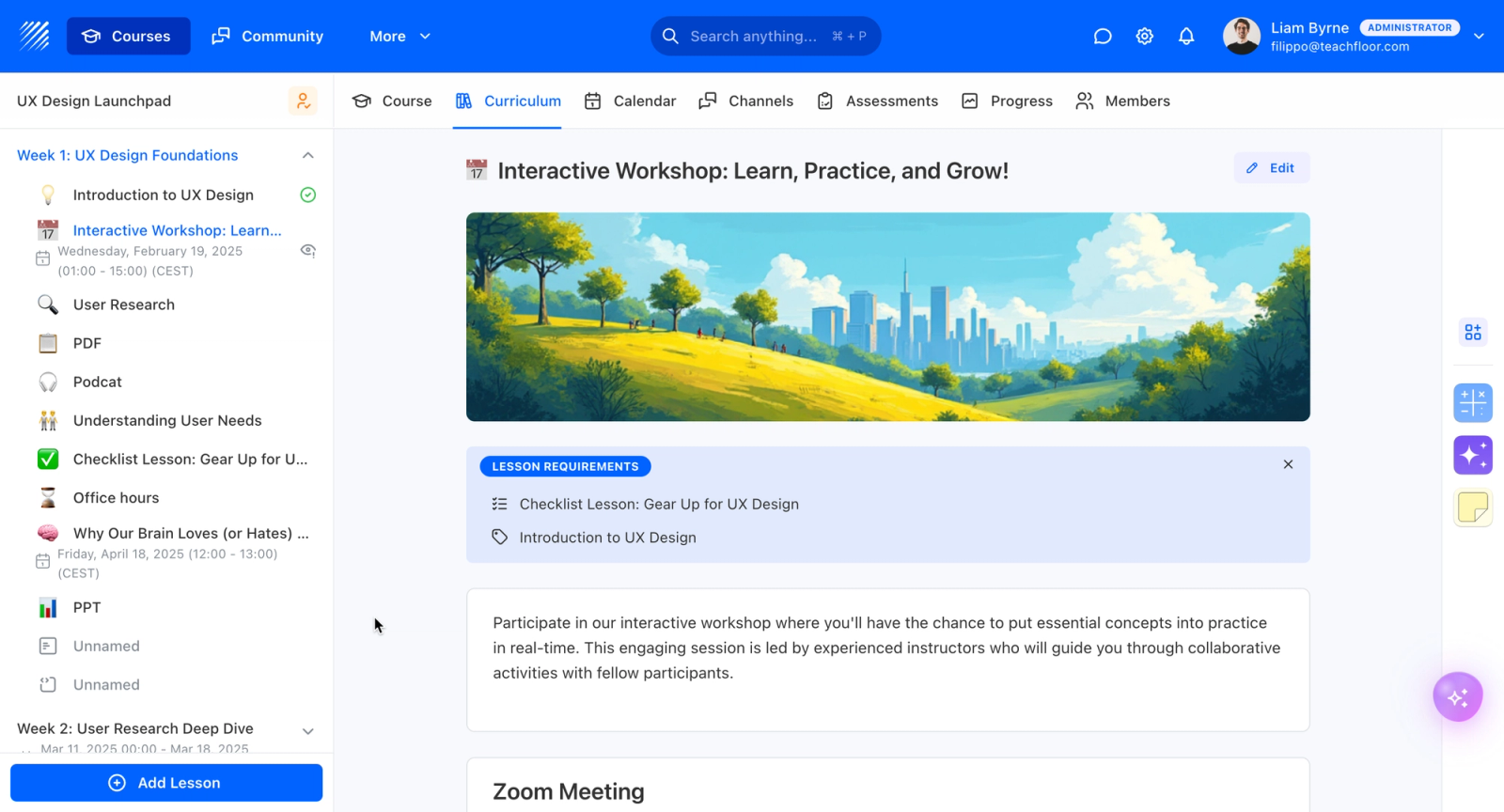
Do not forget to schedule your co-creation meeting with your group by editing the dates. After that, connect your Zoom account on the platform for automatic access to the Zoom link.
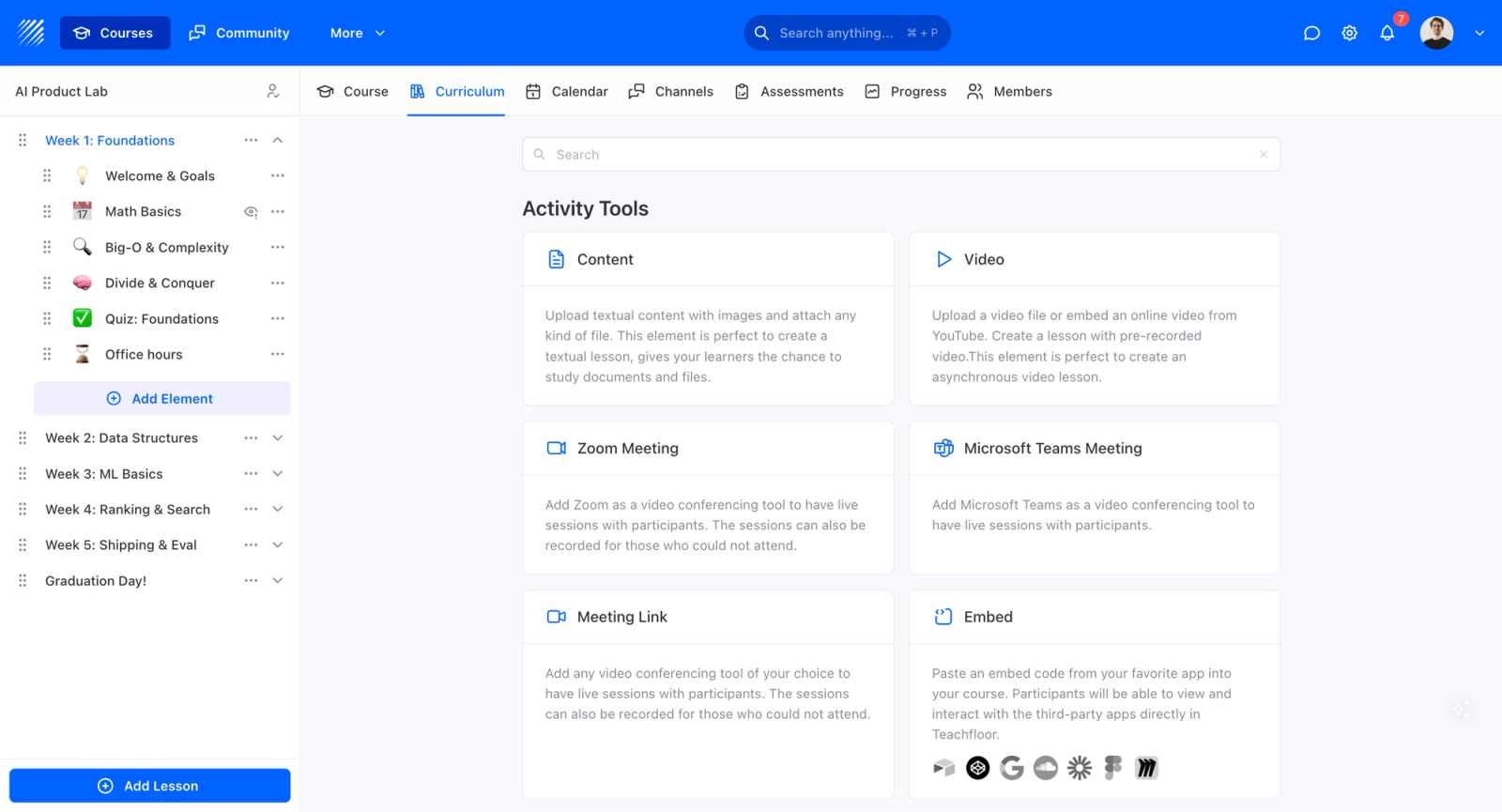
How to “add” a new lesson on Teachfloor.
How to add a new lesson on Teachfloor.
How to Invite Members to Join the Platform
Note: make sure your course is published.
On your dashboard, select "People." Then click on "Invite Participants." You can manually invite them by entering their name and email address, or you can upload a CSV file. The members of your mastermind will automatically receive an email invitation. Another way to do it is to copy the generated link and share it with your members.

That is how you invite participants to join your course on Teachfloor.
Co-create the mastermind activities with your members
Now that you’ve scheduled your first meetup activity, the meeting agenda should consist of co-creating the guidelines, structure, and activities of your Mastermind with your members. Why is it more advisable to co-create than to create it yourself?
Firstly, it's better to know their ideas and suggestions on how they want to form the Mastermind with you. Members will stick around until the end if they feel that their opinions matter to the whole group.
Here is how to moderate this co-creation activity.
Setting Up the Regular Sessions of Your Mastermind
Since all of you are busy entrepreneurs with huge responsibilities in your businesses and companies, it's important to set the frequency and time limit of your sessions with your members.
Are you going to meet once or twice a month? Should you meet during weekends or weekdays? Do you prefer the morning, afternoon, or evening? How long should you meet and discuss this? This must be done by asking about the availability of each member to come up with a consensus.
If we were to design our example Mastermind, our session schedule would be:
- every third Saturday of the month
- across roughly six months
- from 5 pm to 8 pm UTC
Scheduling on Teachfloor
After agreeing on the dates, you can schedule every meeting on Teachfloor. The platform automatically notifies each group member ahead of every session, which keeps a busy mastermind on track without manual reminders.
Scheduling your activities on Teachfloor.
Review of the Initial Ground Rules
Presenting the initial ground rules for every member is also crucial. Ask for feedback and suggestions. Create a document that they can easily comment or edit while you’re discussing.
Here is an example of the initial ground rules:
- Respect both members and time. Be highly respectful of every member and their time during our group meetings and when working asynchronously. Respect each other by watching the language we speak, the questions we ask, and by being on time. Practice non-violent communication (NVC) to create a spirit of harmony in discussions, debates, and talks.
- Giving & receiving feedback. Giving and receiving feedback can be both a blessing and a curse! We recommend using the ABC Feedback Framework guided by four questions: What is Awesome? What is Boring? What is Confusing? and What is Missing? These questions will help us clarify what's working, what's not, what needs to improve, and fill any gaps. Here’s an explainer on how it works.
- Be a Giver. To create a virtuous cycle of growth and success within the group, let's practice being a giver more than a taker. Giving value to others helps us become more successful in our careers and in life. Take it from Adam Grant's famous book, Give & Take: Why helping others drives our success.
Setting up ground rules on the Mastermind Template.
You can add more rules by setting up an accountability structure (or buddy system), attendance requirements, and participation rules.
Embed Code
If you have already created a document outside of Teachfloor, such as a Google doc, you can embed the code inside the platform so that every member can have direct access. It's as easy as 1-2-3!
Set a Meeting Ritual and Structure
We have come to the highlight of the meeting!
Co-create the meeting structure with your mastermind group members. Structuring your mastermind before starting the proper session will help you become more effective and organized. Usually, the creator of the Mastermind is the host or facilitator, but if you have a budget to hire another person to moderate, then do it.
Take a look at this meeting structure example:
The Mastermind group members decided on a 120-minute meeting time with 6 members. The host is the facilitator.
- 5 minutes of waiting time
- 5 minutes of breathing exercise to refresh our minds before we start
- 95 minutes of proper discussion. Each member will have 5 minutes to share updates (wins, failures, and struggles). Group members are open to give feedback and advice for 10 minutes. There will be a 5-minute break in between.
- 10 minutes of general Q&A and check-out round
- 5 minutes of announcement and session feedback
This is how the live sessions could work. Between meetings, the discussion can continue through the community and peer review.
Built-In Community
Keep the community alive by sharing valuable resources and updates and by asking questions through the built-in community. The moment you invite members to join the platform, they get access to the community feature, so live sessions and ongoing conversation stay in one place. This is the same kind of always-on space found on a dedicated learning community platform.
Set up the community with channels according to the topics you want your group to discuss, message them directly for reminders or ask how they are doing, and create a group chat with specific people.
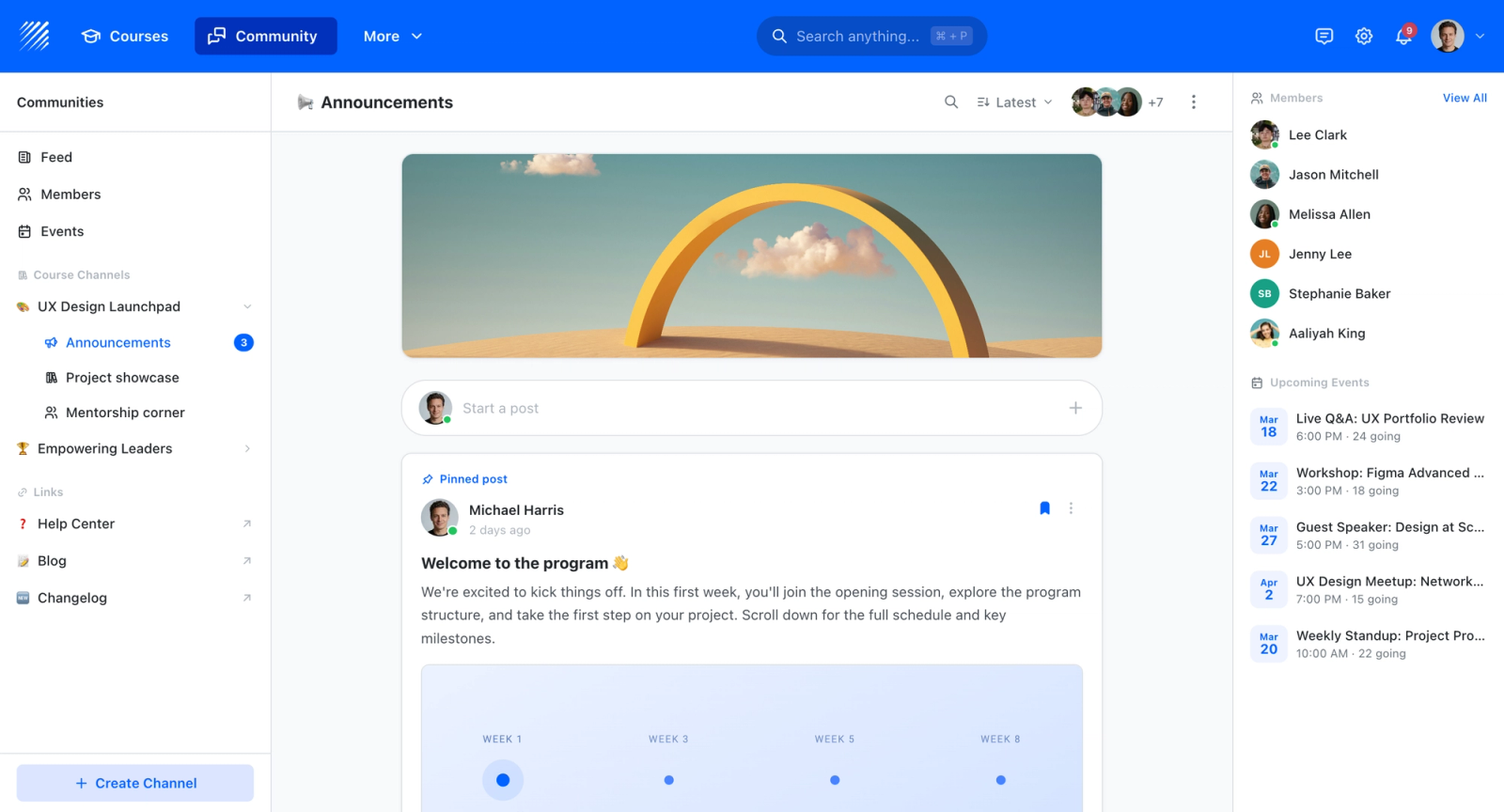
Peer Review
Another feature that increases engagement without much extra time is peer review. Allow members to give and receive feedback even after the live sessions. A peer review element is set up in the template to show how it works.
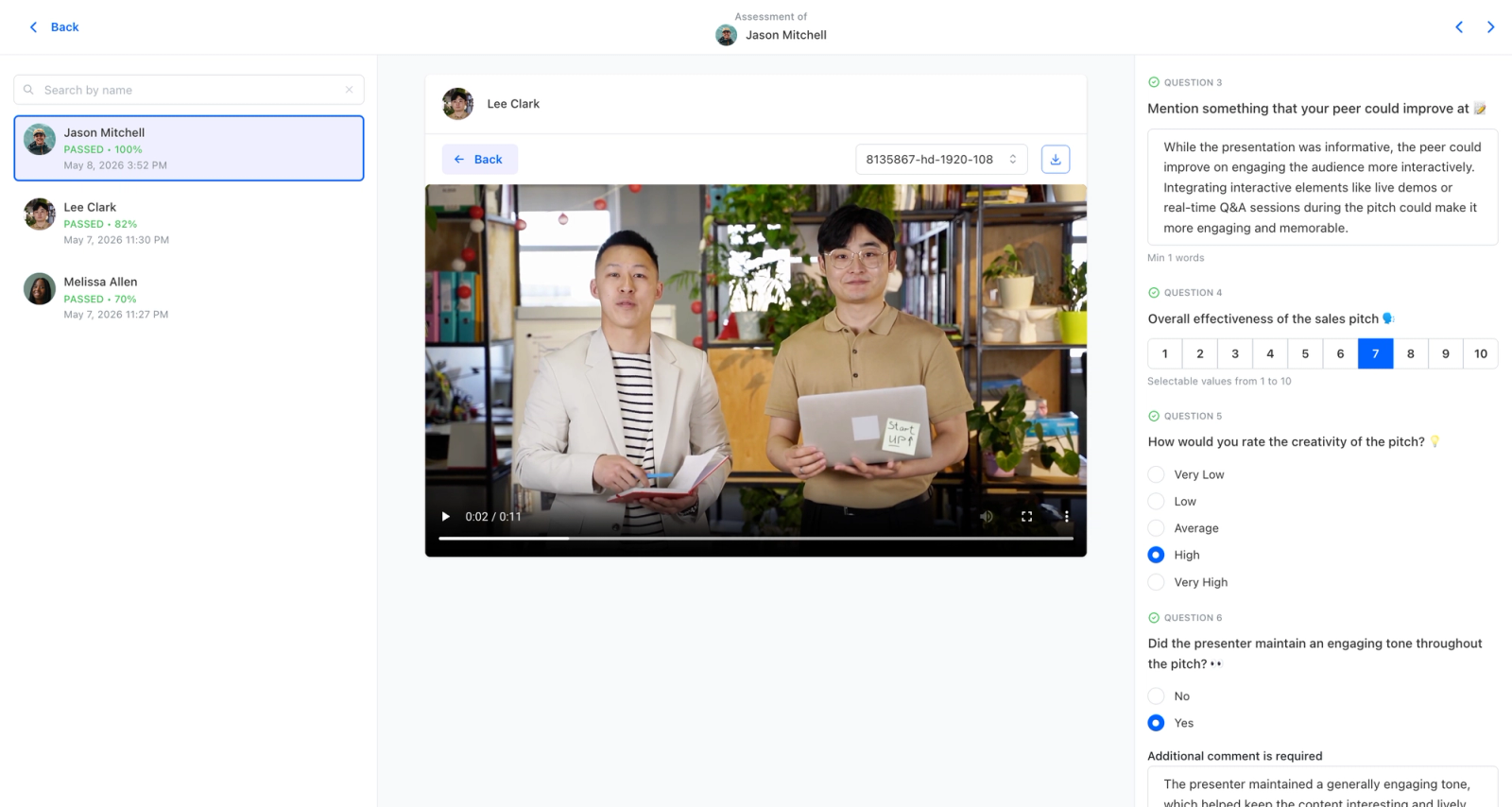
Peer learning works well for mastermind groups because it lets members analyze and understand each other's output and iterate based on their peers' feedback. For more on this approach, see our roundup of the best social learning platforms.
Capture Meeting Notes
Don't forget to capture the most valuable ideas and suggestions through note-taking or recording your meetings.
Zoom Feature
Once you record your live sessions in Zoom, the recordings are accessible on the platform. Links are made available to your members. No need to do it manually.
Another advantageous feature we have on Teachfloor is the “enable meeting report”. It helps you track the attendance and participation time of your students. Reports are made available in Zoom. However, to enable this completely, kindly connect your members’ Zoom accounts on Teachfloor so they may be able to access Zoom.
Zoom recording, meeting reports, and advanced settings are made available on Teachfloor.
Start
You’ve done a lot of work! Now you are ready to start your first Mastermind meeting. Good luck and remember that successful groups happen with teamwork, coordination, and accountability with each other.
Iteration and evaluation
Like any other type of group, online masterminds work best when you experiment and iterate through reflective actions. Set aside time to reflect and restructure sessions partway through the program. The mastermind template includes an extra agenda to re-evaluate what worked and what did not in the previous sessions.
You can run the evaluation meeting by:
- Using the ABC Feedback Framework to get meaningful feedback from each member
- Collecting all the feedback and presenting it during a live discussion
- Taking down notes on the ideas and suggestions of the group
Evaluation Meeting sample in the Mastermind Template
After that, apply the iterations in your next meetings up until the last. Conduct your evaluation meeting only when you have to. These are just guidelines that you can follow.
A Ready-Made Mastermind Template for Busy Entrepreneurs
The setup work is already done in the ready-made template. Growth-oriented entrepreneurs rarely have time for low-ROI tasks like configuring everything on a platform from scratch.
Instead of building a mastermind group over weeks or months, you can launch it in an hour or less. Once you **sign up** for a free trial account on Teachfloor, you get access to all course templates, including the one for mastermind groups. Duplicate the course and customize it as you see fit. Because accountability, cohort-based structure, live sessions, and payments all live in the same place, the template gives you a working mastermind rather than a blank slate.
If you would rather have help, our **eLearning agency** can set up and launch your mastermind for you. It is a service for busy entrepreneurs, course creators, and thought leaders who want to run and create courses on Teachfloor. Start the conversation by **booking a live demo** with the team.
To sum up
Joining or running a mastermind group can be highly beneficial for any entrepreneur. The entrepreneur's journey is rarely easy, and a support group helps. The experience can be meaningful both personally and professionally. May you find the right people to accompany you on your journey.
PS. Teachfloor Team
FAQs on Building a Successful Mastermind
Who should start a Mastermind group?
Mastermind groups are for successful entrepreneurs who are looking for like-minded and competent entrepreneurs with the same or different niches to share struggles, and advice, and grow businesses together. You can start running a Mastermind group if you are in a leadership role, a decision-maker in a specific niche, and you are committed to growing with others.
Examples of these entrepreneurs are small to mid-size business owners, solopreneurs, C-suite executives, investors, founders, and managers in a certain niche or industry.
Who should not start a mastermind group?
Don't start a mastermind if you are early in your career, a student, or a recent graduate. Also avoid starting one if your goal is to run coaching sessions among your members. A mastermind is different from group coaching: even though members can coach one another, the cadence of a coaching program is not the same as a mastermind. If coaching is your aim, a cohort-based course may be a better fit.
How much does a mastermind membership cost?
Masterminds are usually high-ticket group sessions. Fees vary widely depending on the package, duration, domain expertise, niche, and other factors. They commonly range from a few thousand dollars per year at the entry level to the low tens of thousands for premium, executive-level groups.