
New Checkout Customization Options
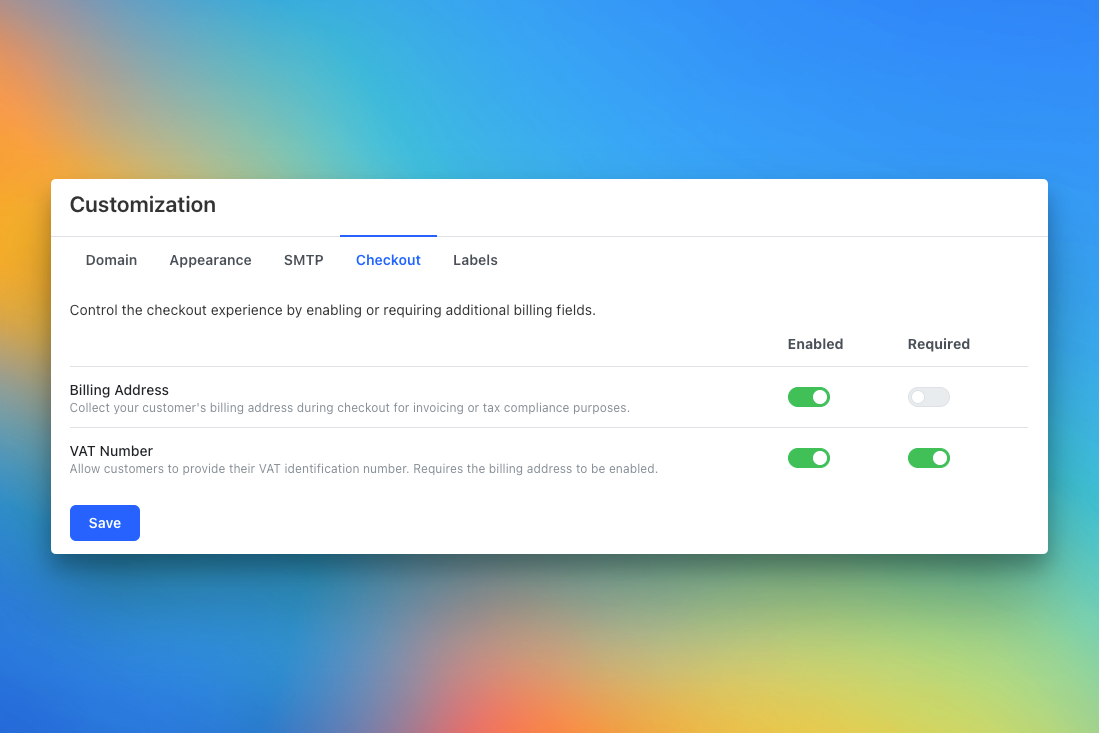
We’ve expanded Teachfloor’s checkout customization to give organizations more flexibility when managing paid course enrollments. You can now collect additional billing details, such as the billing address and VAT number, directly on the checkout page, making invoicing and compliance smoother than ever.
What’s New
In addition to the existing custom fields feature for collecting learner data before payment, the Checkout tab now includes two new configurable options:
- Billing Address — Enable this option to request your customers’ billing address during checkout. This is useful for generating invoices, verifying payment details, or meeting tax requirements.
- VAT Number — Collect a customer’s VAT identification number for tax compliance. This option can be made required for all transactions and is automatically linked to the billing address field.
These options can be enabled or required independently, giving full control over what information is gathered at the time of purchase.
How It Works
- Go to Settings → Customization → Checkout.
- Toggle Billing Address and VAT Number on or off based on your organization’s needs.
- Choose whether each field is optional or required during checkout.
- Save changes your updated checkout form will appear automatically on your course landing pages.
These new fields work seamlessly alongside custom checkout fields, letting you tailor your payment flow to match your business or regional compliance needs.
Why It Matters
This update makes Teachfloor even more versatile for organizations that handle invoicing, B2B clients, or international students.
You can now:
- Meet tax and compliance requirements in different countries.
- Collect complete billing information for accurate invoicing.
- Offer a more transparent and professional checkout experience.
👉 You can find this new option under Settings → Customization → Checkout.
Start collecting the right billing information and simplify your payment process today.


